How to complete your Facebook Thank You post requirement in the follow-up form
- Log into your Petfinder Foundation grant management system account
- Click on the house icon at the top of the Applicant Dashboard page
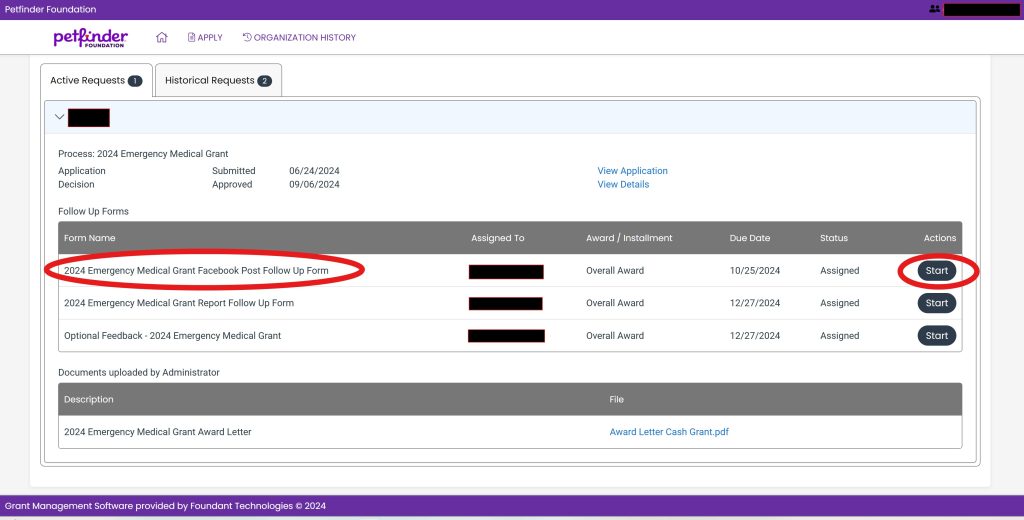
- Scroll down until you find the appropriate grant program and Facebook Post follow-up form
- Click on the Start button (see screenshot below)
- On the follow-up page, scroll down to the “Facebook Post URL” field and paste the URL for your organization’s Facebook Thank You post (see screenshot below)
- After filling in the Facebook URL click the Submit Follow-up button. Once you submit a confirmation page will load stating “Your follow-up has been submitted.” (see screenshot below)
- Click on the blue “Continue” button to return to the Applicant Dashboard page

Please email [email protected] if you experience any issues. Be sure to include your organization’s EIN , Petfinder Shelter ID, name and a screenshot of the problem, if possible.